Wednesday, October 31, 2018

Session #1 - Media Classes are Underway!

October 1st marked the start of Session #1 for the 2018-2019 school year.  In this first session, we will see all the PreKindergarten and 3-year-old Inclusive Opportunities classes.  Here's the list of the classes:
  • Sims (AM class only)
  • Hare (AM class only)
  • Parris (PM class only)
  • Lewis
  • Federline
  • Walderman
  • Geonzon
  • Neri
  • Mazza
  • Short/Littleton
  • McDonald/St.Juste
  • Stephenson
  • Stickley/Denhardt 
  • Vincent/Miranda 
As we did last year, we spent the first few weeks talking about behavior and expectations.  We read these stories...
image of book title
This story outlined expectations of behavior and includes video clips to help with understanding.
This story is from Social Emotional Foundations for Early Learning (SEFEL) and
discusses strategies for dealing with anger and frustration in appropriate ways.

This is also a SEFEL story (modified) and addresses sharing and taking turns.
For more information about SEFEL, you can visit this site.  There are also lots of resources for parents as well.
 
The students were all introduced to our Peace Corner--a cozy spot in the Media Center where anyone can go if they are feeling angry or frustrated or need to calming 
 In addition, we also read The Napping House by Audrey Wood...which all the students enjoyed thoroughly.

This week, we are changing themes.  During the month of November (and the beginning of December) we will be reading Small, Medium, Large by Emily Jenkins.  It's a great story about different sizes and comparing sizes and we learn all sorts of great vocabulary words like huge, enormous, colossal, tiny, miniature, and miniscule. Don't be surprised if you hear some of these great words from your kiddos!  "Colossal" is a fan favorite.
 

Friday, April 13, 2018

Group #2 is well underway now.  As with Group #1, we started the session with some mini-lessons on behavior expectations.  I tried something new this time: recognizing that many of my friends in Group #2 are on the autism spectrum and respond better to visual information, I had one of my PreK classes help me record some videos of what we do during media time. 

As the students arrive, we have a video playing on a loop of kids coming in and sitting on the carpet.  For most of our Group #2 classes, it worked like a charm...most of the time, I didn't even have to give a verbal direction!

Now that we have established our expectations, we've started our regular routine:
  • Greeting--students use their voices or a voice output device to greet Ms. Helen and me.
  • Song--we switch between doing a song or MeMoves (see next bullet) (with a video...we use videos from YouTube from the KidsTV 123 station); some of our favorites are:
  • MeMoves--we move our bodies, trying to imitate the people we see on the screen (for more info about MeMoves, click here to visit their website).
  • Read a story--this is usually a simple and sometimes interactive story on the SMART Board related to our theme.
  • Centers--the students use a Visual Scene Display (see picture) or spoken words to choose a center.
  • photograph of library and tables with pictures overlayed with labels of centers
    Visual Scene Display (VSD) for center choice making
    Dismissal--we meet back together on the carpet after the timer goes off and we clean up our centers so we can say "goodbye" (again, either verbally or using a voice output device).
This past month, the students have enjoyed the activities at the red table--cars and trains!  They have built track for the trains and raced cars through a long cardboard tube.  We will be starting our next theme: Animals...but not until after the school pictures have finished in the library. 😊

Friday, February 16, 2018

Overview of Group #1's Media Time

Well, I have not done a very good job this year of getting this updated as I was supposed to.  I apologize.  I did help create a newsletter for all our Wheatley Specials, though, to share what we are doing in our respective classes.  Here's a link to the school's website, where you can access our first newsletter (and other information)...next one will be coming out on February 26th...which is also the first day for Group #2 to start in Media.

But, back to the plan for this post.  Group #1 started in October.  The classes included in Group #1 were all our PreK classes: Stephenson/Sims, Miranda/Vincent, Pascual, Stickley/Denhardt, Ellis/Short, and McDonald/St.Juste; as well as our 3-year-old Inclusion classes: Copeland, Federline, Walderman, Geonzon, Neri, Lewis, & Hare.

We started out talking about the rules and expectations for the Media center. For instance, our "Carpet Rules"
picture representations of the four rules: sit on shape, look at teacher, listen, use nice hands
We also talked about behavioral expectations and the students were introduced to Tucker Turtle...who helps us remember to think of good solutions to problems. You can download and read the Tucker Turtle story here

After the first month, we started our regular routine--read a story all together and then break into centers.  We have 5 centers this year in Media:
In this center, students explore different
activities on the SMART Board.


In this center, students do different activities on the iPads.

Students can choose a book to read or
they can use interactive materials to retell stories.
 
Students explore activities on our
interactive SMART Table.

Students explore a variety of activities including
Mr. Potato Head, puzzles, and counting and sorting games.

During our first session, these are the books we read together...and the kids LOVED them.

 Some of the PreK classes even got to hear the sequel to Frog on a Log?...which they also loved.
The next two weeks, Wheatley's students will be exploring different activities as part of our Black History Celebration...and then we will welcome our second group to Media.  The 2nd session will include these classes: New, Hunt, Littleton, Shannon/Lance, Andrews, Leyden, Freeman, Parris, Shipps, Santos, Dakes, & Long.  I will try to be a little better about updating the blog once our next session starts.

Wednesday, March 16, 2016

New week...new story

Continuing with our Things That Move theme, we have shifted gears this week.  For the last two weeks, we focused on moving our bodies.  For the next two weeks, we're focused on moving from one place to another--traveling.  

We're reading The Bag I'll Take to Grandma's by Shirley Neitzel...
To make it a little easier for larger classes to see the book, I have projected the book using PowerPoint and our SMART Board.  We also use pictures...
Pictures used with story
 ...and the actual items...
Actual items from the story
...to help with telling the story.  Then we have an activity on the SMART Board to help us with recalling events and vocabulary from the story.  With some of the groups, we will focus on the difference between things we NEED to pack for a trip and the things we WANT to pack.
Balloon Pop - vocabulary from the story

Memory Game - Things we WANT

Sorting Game - want vs. need


Last week in media...

Our theme this month is "Things That Move" so we started the month (first two weeks) with a focus on moving our bodies.

We started out with some MeMoves...


...read From Head to Toe by Eric Carle...and moved along with the book...

...and followed directions in a movement song.
 

Thursday, September 12, 2013

We made a movie!

As this (our first) week draws to a close, I thought I would share one of the videos we made.  When the children visited the MMC this week, they got a *tour* of our centers and met the MMC teachers (me & Miss Helen).  After our tour, they helped us make a video of what they learned using the Storyrobe app on the iPad & some photos I had taken of the different centers and people in the MMC.  We had a lot of fun with it, and the kids did a great job remembering all the names of the centers!

Here's a sample from one of our afternoon PreK classes...


Wednesday, September 11, 2013

New - Language Cards

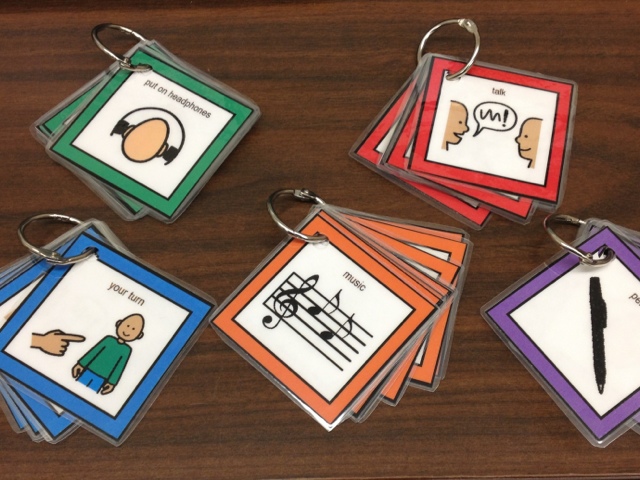
I'm adding some language cards to each center...these can be used by the adults to clarify verbal directions, or for students to ask questions or get assistance. They will be hanging on the center sign in each of the 5 centers...once I get some hooks, that is.
Language cards (visual supports) for centers
I also created a set to use when the whole group meets on the rainbow carpet. 
Visual supports for whole group meeting

Wednesday, September 4, 2013

Welcome Back!

I hope everyone had a wonderful summer!  We are back to school, and getting back to work in the MMC.  We're doing things a little differently this year in the hopes that we will be able to better meet the needs of our students.  We've divided the school into 3 groups, and each group will come to the MMC every week for a 9-week session*.

Here's how the year looks...
Group #1: 9/9/2013 - 11/8/2013
Group #2: 12/2/2013 - 2/7/2014
Group #3: 3/3/2014 - 5/23/2014

So, as you can see, we're getting ready to welcome our first group to the MMC this coming Monday!  That being said, I'd better get back to work to make sure everything is ready!
Stay tuned...

Monday, May 20, 2013

Last week of classes

As another year draws to a close, we are seeing our last visitors of the year in the MMC.  This week will be the final week of classes.
 
Here are some shots of some of our friends during their last visit to the MMC this year...love those smiles!


image of a boy with headphones on


Wednesday, May 1, 2013

visitors in the mmc!

We had some special visitors in the MMC last Thursday!  My boys came in to school for "Take Your Child to Work" Day, and spent the day helping out in the Multimedia Center.  They had a great time meeting all of the kids, and playing with all the cool technology!
Ian, helping out in the SMART table center

CJ, modeling "MeMoves" for the kids in the SMART Board center

And after lunch, we had even more helpers...Mrs. New's boys (who were also visiting Wheatley on Thursday) stopped in to help out, too!
The SMART Table Center was a popular spot for our helpers.


MeMoves


Wednesday, March 13, 2013

my new favorite app

I'm finding it a bit tricky to keep up with the blog at the same time as planning and implementing activities in the MMC...which is why it's been so long since I've posted.  I guess that's a challenge most folks who blog regularly learn to overcome.  I'm still new to the whole "blogging" thing...so, clearly, that is something I need to work on. :) 

Today (a day without classes in the MMC),  I am working on getting the iPads all updated and "supervised" using the Apple Configurator app (on the new MacBook we got to go along with our new mobile iPad cart).  This has been a learning experience to be sure--and I'm still trying to get the hang of it.  

Anyway...while I was purchasing app codes and installing apps, I was playing around with an app I had purchased for myself (to try it out before buying it for the school).  I was looking for some good cause/effect apps for our students with more significant disabilities and stumbled upon this one.  I thought it was cool on the surface...but then today I really played with it, and found out just how cool it is.  

So, here it is--Cause and Effect Sensory Light Box.  It's $2.99, but if you have kids at this level, it's totally worth it.
Cause and Effect
Sensory Light Box app
This is the main *menu* page...with all the different cause/effect activities.  Touching one of the choices opens up the activity--they all have sound & something visual...some have music.  Note: it works best if you disable the Multitasking features in the Settings.


Light box menu page
If you click on the circle up in the right-hand corner, though, you get to the settings...which opens up all sorts of opportunities for kids at all different levels!  


*Settings* menu within the app
As you can see, you can set it up to work with a Bluetooth switch (which is one of the things I tested out today...works great).  If you're not sure what settings you might want, you can touch the ? at the bottom (right) to get suggestions.  There are some "what you might want" ideas along the left side...and some "here's which settings to change to get there" on the right once you touch one of the ideas.  Nifty.  I thought the "encourage vocalization" one was pretty cool.  I tested that one, too, and it also works great!

suggested settings to encourage a student to vocalize
I'm excited to try this out with some of our groups!  There's a PTA practice performance tomorrow, so I don't know if we'll get any classes to the MMC tomorrow...if not,  we'll try it out soon and I'll let you know how it goes.


Monday, February 11, 2013

Another video...

I had taken this video a couple of weeks ago (when we were still talking about animals), but I forgot to post it. 

Here are some students working at the SMART table center...


Story Retelling Fun

We've started work in the Construction Zone (our next theme)...
...and one of the activities the students can choose during our centers is a "story retelling" of the Three Little Pigs using the Puppet Pals HD app on the iPad (and the story retelling props from Houghton Mifflin's website).  

I wanted to share the videos made by two students in Ms. Perkins' (Head Start) class with only a little help from me.  This was the first time they had every used this app...and I think they did a great job!   I apologize for the raspy voice in the background--I have a cold, and my voice sounds terrible. :)

The first one, retold by Janiya: 


 ...and the second, retold by Alisha:


Not bad for a first try, huh?  Such a fun app.  Hopefully, we'll have more videos to share as our classes get more practice.

Thursday, January 17, 2013

Learning about animals

Well, we are busy, busy, busy in the MMC (which is why I haven't posted in awhile...sorry about that). All centers (for the most part) are open and running.  We are currently in our Animals Everywhere theme...so all our center activities are focused on animals.  

Choosing a center at the Launch Pad
In the SMART table center, we are looking at different animal habitats, and different sounds made by different animals.
Working in the SMART table center
In the SMART board center, we are identifying animals by their sounds, counting, and measuring different animals.
Putting 5 deer in the scene at the SMART board center

On the iPads (in the iListen & iLearn center), we are learning all sorts of things about all sorts of different animals; and on the iPods, we are listening to music, stories, and sounds.
Learning about puffins with Animal Flash Cards (app)

Learning about giraffes with ABC Wildlife (app)

"This is the same story we heard in the classroom!"
-at the iListen & iLearn center

 Reading about animals in the Read to Me center...
Reading along with a story on the iPod

Reading Brown Bear, Brown Bear
with the AnyBook Reader
Our computer center is still evolving...we've been using it more with our students who have more significant learning needs, to work on cause and effect activities using switches.  So far, they have loved it.  

Today we tried a simple story activity with our other classes (using Clicker 6).  I hope to have some more early reading/writing activities up and running in the computer center very soon.
Reading "Rosie's Bone" on the computer
Everyone seems to be having fun, and learning about animals at the same time!