Here's a sample from one of our afternoon PreK classes...

Thursday, September 12, 2013
We made a movie!
As this (our first) week draws to a close, I thought I would share one of the videos we made. When the children visited the MMC this week, they got a *tour* of our centers and met the MMC teachers (me & Miss Helen). After our tour, they helped us make a video of what they learned using the Storyrobe app on the iPad & some photos I had taken of the different centers and people in the MMC. We had a lot of fun with it, and the kids did a great job remembering all the names of the centers!
Here's a sample from one of our afternoon PreK classes...
Here's a sample from one of our afternoon PreK classes...

Wednesday, September 11, 2013
New - Language Cards
I'm adding some language cards to each center...these can be used by the adults to clarify verbal directions, or for students to ask questions or get assistance. They will be hanging on the center sign in each of the 5 centers...once I get some hooks, that is.
I also created a set to use when the whole group meets on the rainbow carpet.
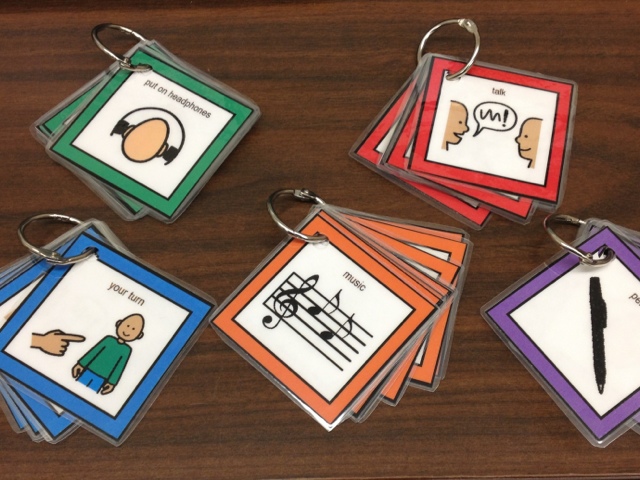 |
| Language cards (visual supports) for centers |
 |
| Visual supports for whole group meeting |
Wednesday, September 4, 2013
Welcome Back!
I hope everyone had a wonderful summer! We are back to school, and getting back to work in the MMC. We're doing things a little differently this year in the hopes that we will be able to better meet the needs of our students. We've divided the school into 3 groups, and each group will come to the MMC every week for a 9-week session*.
Here's how the year looks...
Group #1: 9/9/2013 - 11/8/2013
Group #2: 12/2/2013 - 2/7/2014
Group #3: 3/3/2014 - 5/23/2014
So, as you can see, we're getting ready to welcome our first group to the MMC this coming Monday! That being said, I'd better get back to work to make sure everything is ready!
Stay tuned...
Here's how the year looks...
Group #1: 9/9/2013 - 11/8/2013
Group #2: 12/2/2013 - 2/7/2014
Group #3: 3/3/2014 - 5/23/2014
So, as you can see, we're getting ready to welcome our first group to the MMC this coming Monday! That being said, I'd better get back to work to make sure everything is ready!
Stay tuned...
Monday, May 20, 2013
Last week of classes

As another year draws to a close, we are seeing our last visitors of the year in the MMC. This week will be the final week of classes.
Here are some shots of some of our friends during their last visit to the MMC this year...love those smiles!


Wednesday, May 1, 2013
visitors in the mmc!
 |
| Ian, helping out in the SMART table center |
 |
| CJ, modeling "MeMoves" for the kids in the SMART Board center |
And after lunch, we had even more helpers...Mrs. New's boys (who were also visiting Wheatley on Thursday) stopped in to help out, too!
 |
| The SMART Table Center was a popular spot for our helpers. |

 |
| MeMoves |
Wednesday, March 13, 2013
my new favorite app
I'm finding it a bit tricky to keep up with the blog at the same time as planning and implementing activities in the MMC...which is why it's been so long since I've posted. I guess that's a challenge most folks who blog regularly learn to overcome. I'm still new to the whole "blogging" thing...so, clearly, that is something I need to work on. :)
Today (a day without classes in the MMC), I am working on getting the iPads all updated and "supervised" using the Apple Configurator app (on the new MacBook we got to go along with our new mobile iPad cart). This has been a learning experience to be sure--and I'm still trying to get the hang of it.
Anyway...while I was purchasing app codes and installing apps, I was playing around with an app I had purchased for myself (to try it out before buying it for the school). I was looking for some good cause/effect apps for our students with more significant disabilities and stumbled upon this one. I thought it was cool on the surface...but then today I really played with it, and found out just how cool it is.
So, here it is--Cause and Effect Sensory Light Box. It's $2.99, but if you have kids at this level, it's totally worth it.
This is the main *menu* page...with all the different cause/effect activities. Touching one of the choices opens up the activity--they all have sound & something visual...some have music. Note: it works best if you disable the Multitasking features in the Settings.
If you click on the circle up in the right-hand corner, though, you get to the settings...which opens up all sorts of opportunities for kids at all different levels!
As you can see, you can set it up to work with a Bluetooth switch (which is one of the things I tested out today...works great). If you're not sure what settings you might want, you can touch the ? at the bottom (right) to get suggestions. There are some "what you might want" ideas along the left side...and some "here's which settings to change to get there" on the right once you touch one of the ideas. Nifty. I thought the "encourage vocalization" one was pretty cool. I tested that one, too, and it also works great!
I'm excited to try this out with some of our groups! There's a PTA practice performance tomorrow, so I don't know if we'll get any classes to the MMC tomorrow...if not, we'll try it out soon and I'll let you know how it goes.
Today (a day without classes in the MMC), I am working on getting the iPads all updated and "supervised" using the Apple Configurator app (on the new MacBook we got to go along with our new mobile iPad cart). This has been a learning experience to be sure--and I'm still trying to get the hang of it.
Anyway...while I was purchasing app codes and installing apps, I was playing around with an app I had purchased for myself (to try it out before buying it for the school). I was looking for some good cause/effect apps for our students with more significant disabilities and stumbled upon this one. I thought it was cool on the surface...but then today I really played with it, and found out just how cool it is.
So, here it is--Cause and Effect Sensory Light Box. It's $2.99, but if you have kids at this level, it's totally worth it.
 |
| Cause and Effect Sensory Light Box app |
 |
| Light box menu page |
 |
| *Settings* menu within the app |
 |
| suggested settings to encourage a student to vocalize |
Monday, February 11, 2013
Another video...
I had taken this video a couple of weeks ago (when we were still talking about animals), but I forgot to post it.
Here are some students working at the SMART table center...
Here are some students working at the SMART table center...
Subscribe to:
Posts (Atom)